
table of content


15 Business Processes to Automate with AI Agents in 2026
Top 15 Business Processes You Can Automate with AI Agents
Business process automation used to mean rules, triggers, and if-this-then-that logic. AI agents change what’s actually automatable, since a workflow that requires judgment, context, or a decision between several reasonable options no longer has to route to a human by default. This piece walks through 15 specific business processes where AI agents are already running in production today, what each one actually does, and where the real evidence for value shows up.
At CodeStore, we build custom AI agents for exactly these kinds of workflows. See our core services or contact us if one of these matches a process you’re looking to automate.
Why This List Looks Different From a Generic Automation List
Before the list itself, one distinction matters. A rule-based automation tool executes a fixed script: if a field matches X, do Y. An AI agent reasons: it reads unstructured input, classifies it, decides between multiple valid next steps, and takes action across more than one system without a human approving every step. According to Capgemini research on enterprise adoption intent, procurement and supply chain planning (94%), customer support (91%), financial planning and analysis (89%), recruitment (84%), and performance management (74%) are the functions where organizations report the strongest intent to deploy AI agents, a useful map for where this list draws from.
The 15 Processes
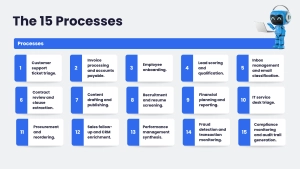
1. Customer support ticket triage. An agent reads each incoming message, classifies it (billing, technical, account, spam), and routes it to the right team or resolves it directly for common questions like password resets and order status. This is one of the most mature agentic use cases by volume, and among the functions Capgemini research found closest to full deployment.
2. Invoice processing and accounts payable. An agent extracts data from incoming invoices using OCR, validates amounts against purchase orders, flags discrepancies, and routes approvals, cutting a task that traditionally consumes hours of manual data entry down to a review-and-approve step.
3. Employee onboarding. A signed offer letter triggers an agent to create accounts across every system a new hire needs, send calendar invites, assign first-week tasks, and notify the relevant team, turning a process that traditionally spans a full day of manual setup into something closer to 30 minutes.
4. Lead scoring and qualification. An agent reads inbound form submissions, enriches them with firmographic and behavioral data, and scores intent so sales reps spend their time on genuinely promising leads instead of manually triaging a form that generates dozens of submissions a week.
5. Inbox management and email classification. An agent reads a shared inbox, classifies each message as a lead, support request, billing question, or spam, drafts replies to common questions, and escalates anything genuinely ambiguous to a person with full context already attached.
6. Contract review and clause extraction. An agent reads an incoming contract, extracts key terms (payment terms, termination clauses, penalties), compares them against a standard template, and flags deviations for a human to approve or negotiate, rather than requiring a lawyer to read every page of every contract from scratch.
7. Content drafting and publishing. An agent with access to a company’s case studies, brand voice guidelines, and prior content drafts social posts and newsletter copy, with a human approving before publishing, while a second agent tracks engagement and recommends future topics.
8. Recruitment and resume screening. An agent screens incoming applications against a role’s actual requirements, schedules interviews across multiple calendars, and drafts personalized candidate outreach, while final hiring decisions stay with a human reviewer.
9. Financial planning and reporting. An agent consolidates data across disconnected systems, flags variances against forecast, and drafts a first-pass report for a finance team to review, a function Capgemini research found among the highest-intent categories for agent deployment.
10. IT service desk triage. An agent classifies incoming tickets, resolves common issues (password resets, access requests) automatically, and routes anything requiring specialized attention to the right internal team, reducing the volume that ever reaches a human queue.
11. Procurement and reordering. An agent monitors inventory levels, supplier reliability, and shipping lead times simultaneously, adjusting orders or flagging a needed intervention when any of those variables shifts unexpectedly, rather than waiting for a person to notice a gap.
12. Sales follow-up and CRM enrichment. After a prospect interaction, an agent pulls the record, scores intent, drafts a follow-up email, schedules the send, and logs the outcome back into the CRM automatically, closing a loop that otherwise depends entirely on a rep remembering to do it.
13. Performance management synthesis. An agent aggregates feedback from multiple sources, flags patterns across a team, and drafts a summary ahead of a review cycle, while the actual evaluation and any consequential decision stays with a manager.
14. Fraud detection and transaction monitoring. An agent evaluates transactions against multiple risk signals in real time, flagging or blocking suspicious activity automatically, with human review reserved for cases above a defined risk threshold.
15. Compliance monitoring and audit trail generation. An agent continuously checks operational data against relevant regulatory requirements, flags exceptions as they occur rather than during a periodic audit, and maintains a running, exportable audit trail, reducing the scramble that typically precedes a compliance review.
Which of These Deliver the Fastest Return
Not all 15 processes pay back on the same timeline, and it’s worth separating them by how quickly the investment shows up in a measurable result. Ticket triage, invoice processing, and inbox classification tend to deliver value within weeks of going live, since the workflow is high-volume, the rules are relatively clear, and the baseline cost of the manual process (hours spent sorting, routing, and re-keying data) is easy to measure before and after. Contract review and financial reporting automation take longer to fully trust, since the stakes of a missed clause or a misreported number are higher, and most teams run these agents in a review-first mode for several months before granting more autonomy.
Fraud detection and compliance monitoring sit at the far end of this spectrum. The technology works, but the validation period tends to be longer by design, since the cost of a false negative (a missed fraudulent transaction or a compliance gap) is high enough that most organizations deliberately extend the testing window before relying on the agent’s output without a human backstop. None of this means these processes aren’t worth automating. It means the timeline to full trust, not just full deployment, varies significantly across this list, and planning for that difference upfront avoids the disappointment of judging a six-month compliance rollout against the two-week payback of a support ticket triage system.
What Ties These 15 Processes Together
Every process on this list shares a few structural traits worth naming explicitly, since they explain why these specific workflows automate well with AI agents while plenty of others don’t. Each one is high-volume enough that the time saved compounds meaningfully. Each one involves classification or judgment that a rigid rule set handles poorly, a support ticket rarely fits neatly into one predefined category, and a contract clause rarely matches a template exactly. And each one produces output that’s relatively easy to verify, whether automatically (a test passes, a total reconciles) or through a fast human review, rather than requiring deep, ambiguous judgment on every single instance.
McKinsey findings on enterprise AI scaling reinforce this pattern from a different angle: organizations that redesigned the underlying workflow around what an agent could actually do, rather than layering an agent onto an unchanged process, were far more likely to report meaningful cost reductions. Simply pointing an agent at an existing, cluttered process rarely produces the same result as rebuilding the process around the agent’s actual capabilities.
Real Costs and Timelines, Not Just Capabilities
It’s worth being concrete about what deploying one of these processes actually costs, since capability alone doesn’t answer the budgeting question. Recent deployments documented by an automation firm working with small and mid-sized businesses put inbox classification and triage at roughly 700 to 1,150 euros to build with 7 to 18 euros a month in upkeep, delivering an estimated 6 to 12 hours a week of saved staff time. Contract review agents ran closer to 1,850 to 4,700 euros to build, with a reported 10x improvement in review speed. Onboarding automation, spanning account creation across multiple systems, was reported to cut a roughly two-day manual process down to about 30 minutes. These figures are from a single firm’s SMB client base and will vary by region, system complexity, and integration scope, but they’re a useful reality check against inflated enterprise-platform pricing: several of the highest-value automations on this list don’t require a six-figure custom build to deliver a measurable return.
Where to Start If You’re Automating More Than One Process
Not every process on this list belongs in a first pilot, and trying to automate several at once is one of the more common ways an AI agent initiative stalls before it proves value anywhere. A enterprise guide to workflow automation makes a point worth taking seriously: the shift agentic AI represents isn’t a better chat interface, it’s agents owning a full, high-volume, policy-driven workflow end to end, which means the strongest first candidate is usually a single process with clear rules, high volume, and low ambiguity, support ticket triage or invoice processing, for instance, rather than a process still evolving or requiring significant judgment, like strategic financial forecasting.
Common Misconceptions
“Automating a process with an AI agent means removing the human from it entirely.” Nearly every process on this list keeps a human in the loop somewhere, approving a flagged contract clause, reviewing a fraud alert above a risk threshold, or making the final hiring call. The agent absorbs the repetitive classification and drafting work; the consequential decision generally stays with a person.
“These processes require an enterprise-scale budget to automate.” Several of the highest-ROI processes on this list, inbox triage, lead scoring, follow-up automation, have been deployed for a few thousand dollars or less by small and mid-sized businesses, not just large enterprises with dedicated AI teams.
“Once one process is automated, the rest will follow the same pattern.” Each process has a different mix of volume, ambiguity, and verifiability, which means the right architecture, and the right level of autonomy to grant the agent, varies meaningfully from one process to the next. A pattern that works well for invoice processing won’t necessarily transfer directly to contract review.
“Any AI tool that touches a workflow counts as agentic automation.” A chatbot answering a question inside a fixed script isn’t automating the process, it’s assisting with one small piece of it. The processes on this list involve an agent taking multi-step action across systems, not just responding to a query.
How to Choose Which Process to Automate First
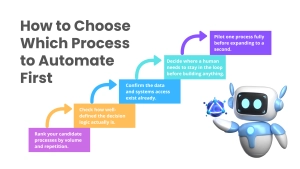
- Rank your candidate processes by volume and repetition. A process that happens hundreds of times a week justifies automation investment faster than one that happens occasionally.
- Check how well-defined the decision logic actually is. Support triage and invoice validation have relatively clear rules; strategic planning does not, and forcing agentic automation onto the latter usually disappoints.
- Confirm the data and systems access exist already. An agent can only automate a process it can actually reach; disconnected systems or missing API access are a more common blocker than model capability.
- Decide where a human needs to stay in the loop before building anything. Set this explicitly rather than defaulting to full autonomy and scaling back later.
- Pilot one process fully before expanding to a second. A single, well-executed automation builds the internal case, and the internal expertise, needed to expand faster the second and third time.
At CodeStore, this is the sequence we walk clients through when deciding which process to automate first, and how to scope it so the pilot actually proves the case for expanding further. Contact us if you’re trying to figure out where to start, or explore our core services.
Frequently Asked Questions
The Bottom Line
The 15 processes above share a common thread: high volume, judgment that a rigid rule set handles poorly, and output that’s realistically verifiable. That combination is what makes them genuinely well suited to AI agents rather than requiring either a purely manual process or a brittle rule-based automation tool. The organizations getting real value from this shift aren’t automating everything at once. They’re picking one well-defined process, proving it works, and using that as the template for the next.
Trying to figure out which of these processes is the right starting point for your organization? Contact us or explore our core services.