
table of content
- Why Enterprises Are Moving Beyond AI Experiments
- What Is Enterprise Agentic AI Implementation?
- Where Can Enterprises Use Agentic AI in 2027?
- Why Enterprise AI Projects Struggle to Scale
- A Practical Roadmap for Enterprise Agentic AI Implementation
- The Technology Stack Behind Reliable AI Agents
- How Real AI Product Development Supports Enterprise Readiness
- What Should Businesses Look for in an Agentic AI Development Partner?
- What Will Enterprise Agentic AI Look Like in 2027?
- Conclusion
- Frequently Asked Questions


From AI Experiments to Enterprise Results: The Future of Agentic AI in 2027
Key Takeaways
- Agentic AI can manage multi-step workflows rather than simply respond to individual prompts.
- Enterprise adoption requires integration with existing business applications, databases, and internal processes.
- Large organizations are moving faster toward scaling AI agents, but measurable financial impact remains a challenge.
- Data quality, security, governance, and human oversight are essential for reliable deployments.
- Businesses should begin with a clearly defined workflow and expand after measuring its performance.
- The real value of agentic AI comes from improving business processes, not simply adding more AI tools.
Agentic AI can pursue a goal, use approved software tools, and complete multi-step tasks with limited human help. Making that work across a whole enterprise takes far more than a good demo.
AI has moved well beyond simple chatbots. Businesses are now placing AI agents inside everyday operations, not just using AI to answer questions.
A pilot shows what the technology can do. Real adoption needs reliable data, connected systems, security controls, clear decision boundaries, and measurable results.
As 2027 approaches, the focus is shifting to connected systems that deliver steady value. This guide covers where AI agents are used, why projects stall, and how to get started.
Why Enterprises Are Moving Beyond AI Experiments
Assistants that only draft or summarize still leave people to carry out every next step. AI agents can take those steps themselves, within approved limits.
An agent can receive a goal, plan the steps, use approved tools, and check its own results. When a task falls outside its permissions, it asks a human for help.
In customer service, a chatbot answers a question about an order. An agent connected to business systems can go further:
- Identify the customer and retrieve the order.
- Check delivery information and compare it with the request.
- Create a support ticket if needed and notify the right team.
- Update the customer when the next action is completed.
The key difference is that the agent coordinates several steps instead of stopping at an answer.
What Does the Latest AI Adoption Data Show?
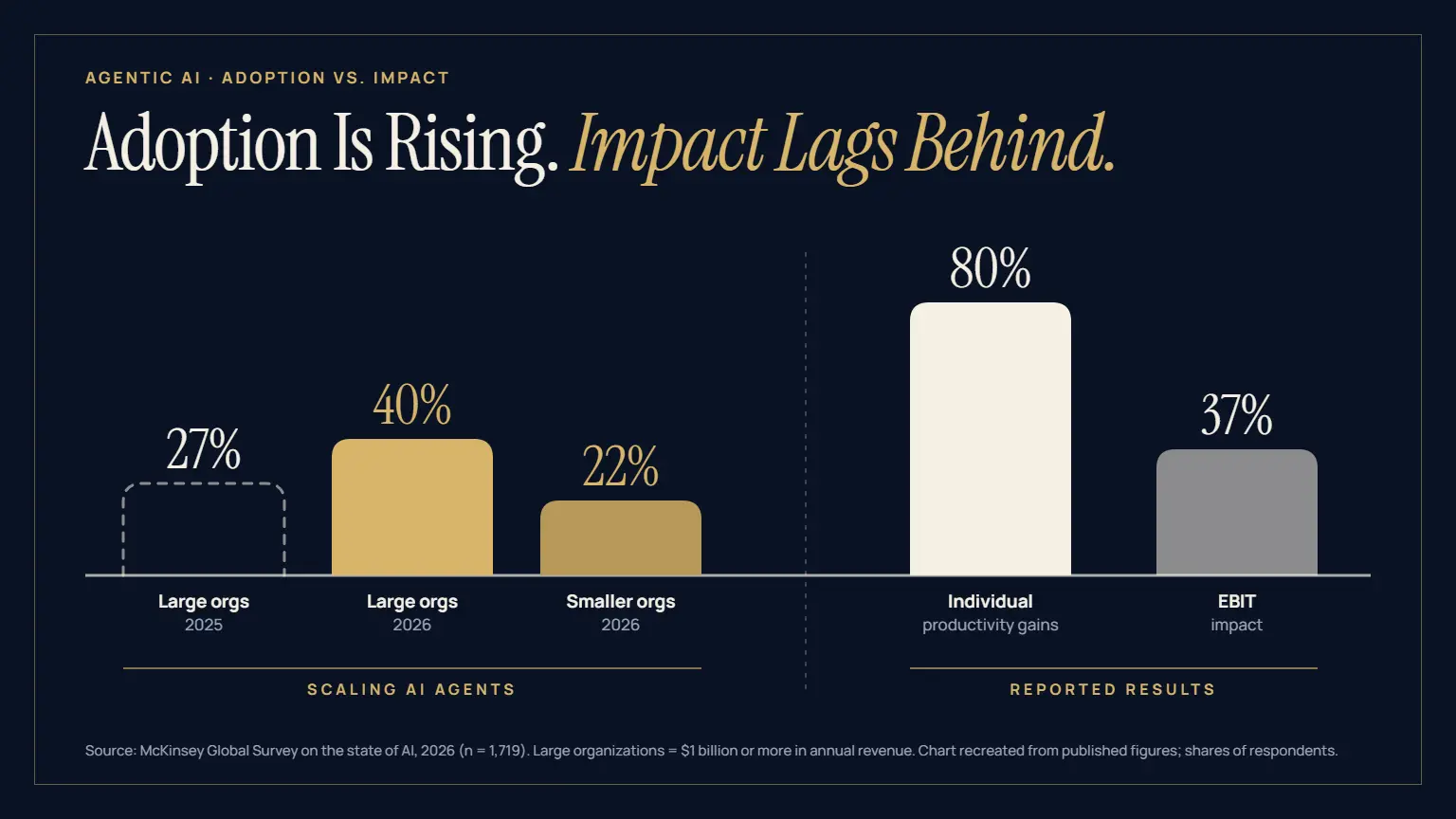
AI agents are spreading fastest in large enterprises, but financial impact still lags behind individual productivity gains.
According to McKinsey’s The State of AI in 2026 (1,719 respondents), 40% of respondents at organizations with over $1 billion in revenue were scaling AI agents in at least one business function, up from 27% a year earlier.
Smaller organizations stayed flat at about 22%.
About 80% of respondents said AI improved their individual productivity, but only 37% said it contributed to earnings before interest and taxes (EBIT), a measure of operating profit.
The lesson for 2027: adding AI is not the same as improving business performance. Agents must connect to the processes that matter.
What Is Enterprise Agentic AI Implementation?
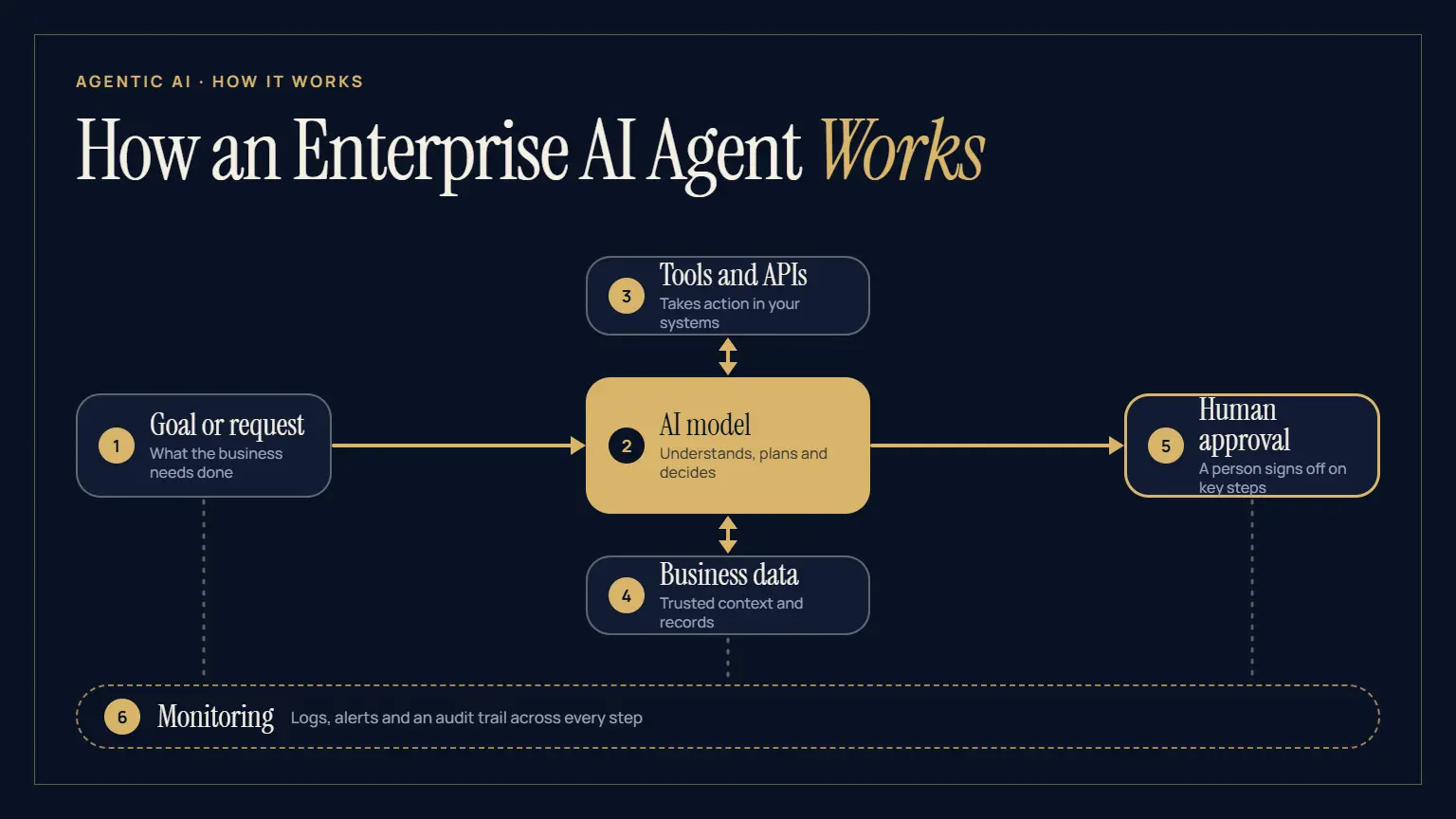
Put simply, it is the process of getting AI agents to do real work inside a company’s existing systems, safely and measurably.
Unlike a standalone assistant, an enterprise agent must work across multiple systems and follow company policies. That is why enterprise agentic AI implementation covers designing, integrating, deploying, and managing agents inside existing business environments.
Six building blocks make this work:
- AI models understand instructions, interpret information, and support decision-making.
- Tools and application programming interfaces (APIs) allow agents to interact with approved applications and services.
- Business data provides the context required to complete tasks accurately.
- Workflow orchestration manages task sequences, agent communication, and execution.
- Security controls define what information and actions an agent can access.
- Monitoring and evaluation track performance, errors, costs, and outcomes.
Consider a procurement agent. It can review purchase requests, compare approved pricing, and prepare a recommendation for a manager.
It should not approve every transaction on its own. Financial limits and approval rules must stay in the workflow, because automation needs control.
Where Can Enterprises Use Agentic AI in 2027?
Enterprises can use agentic AI wherever work is repetitive, spans several applications, and follows clear rules. The table summarizes five common areas.
| Business area | What an AI agent can help with | Where people stay involved |
| Customer service | Sorting incoming requests, retrieving customer information, spotting common issues, starting approved support workflows | Cases that need judgment, involve sensitive data, or fall outside the agent’s authority |
| Healthcare administration | Appointment requests, retrieving approved administrative information, routing documents, checking forms, sending reminders | Clinical decisions and anything covered by patient privacy requirements |
| Supply chain and logistics | Monitoring inventory, flagging possible shortages, reviewing delivery updates, alerting the responsible employee | Decisions with significant financial or operational risk |
| Finance and internal operations | Extracting invoice data, comparing records, identifying missing details, routing exceptions | Mismatched amounts, missing documents, and final approvals |
| IT and software engineering | Classifying tickets, retrieving documentation, suggesting troubleshooting steps, supporting code review and testing | Production changes, privileged access, and security-sensitive actions |
1. Customer Service and Experience
AI agents can sort incoming requests, pull up customer information, spot common issues, and start approved support workflows.
For example, an agent could recognize a billing complaint and prepare a case for the billing team. People should step in when a case needs judgment or involves sensitive data.
2. Healthcare Administration
In healthcare, AI agents suit administrative work, not clinical decisions.
With strict access controls, they can support appointment requests, route documents, check form status, and send reminders.
Design these tools around patient privacy and clinical safety. They should never replace medical professionals.
3. Supply Chain and Logistics
In supply chain operations, an agent can spot problems early and alert the right person.
It can monitor inventory, flag possible shortages, review delivery updates, and notify staff when a shipment is delayed.
A more advanced setup can coordinate specialized agents:
- An inventory agent monitors stock levels.
- A supplier agent checks order and delivery information.
- A logistics agent reviews shipment updates.
- A reporting agent prepares an operational summary.
Employees approve decisions that carry significant financial or operational risk.
4. Finance and Internal Operations
In finance, agents can check documents against each other and route exceptions to people.
For example, an agent can compare an invoice with the purchase order and delivery record. If everything matches, it prepares the invoice for approval. If not, it flags the issue instead of proceeding.
5. IT and Software Engineering
IT teams can use agents to triage and resolve routine requests, such as classifying tickets, retrieving documentation, and suggesting fixes.
Coding agents can help developers understand codebases, generate tests, and review changes. Production changes and privileged access should still follow standard review procedures.
Why Enterprise AI Projects Struggle to Scale
Pilots run under controlled conditions. Real operations bring incomplete data, conflicting records, unexpected requests, unavailable APIs, and growing costs.
Gartner’s June 2025 press release forecast that over 40% of agentic AI projects will be canceled by the end of 2027, citing escalating costs, unclear business value, or inadequate risk controls. That is a forecast, not a measured result.
Fragmented Data and Disconnected Systems
Agents struggle when they cannot reach the right data. It is often scattered across customer relationship management (CRM) platforms, enterprise resource planning (ERP) systems, databases, and documents.
Companies need reliable data access, consistent definitions, and proper permissions before expanding.
Unclear Decision Boundaries
An agent needs to know exactly what it may do. Define these limits before deployment, not after the first mistake.
For example, it may create a support ticket but not issue a refund above a set amount.
Unreliable Tool Integrations
One failing integration can break a whole workflow. An API may go down, return incomplete data, or process a request twice.
Reliable systems need error handling, retry limits, validation, activity logs, and recovery procedures.
Uncontrolled Operating Costs
A single task can trigger many model and tool calls. In McKinsey’s 2026 survey, about one in five respondents said AI operating costs, including token costs (usage-based charges for processing text), were limiting their AI use.
Track model usage, response times, and cost per completed workflow. Sometimes a smaller model or simpler automation works better.
A Practical Roadmap for Enterprise Agentic AI Implementation
The safest path is to start small and expand only after results are proven. In most organizations, a sound enterprise agentic AI implementation follows the seven steps below.
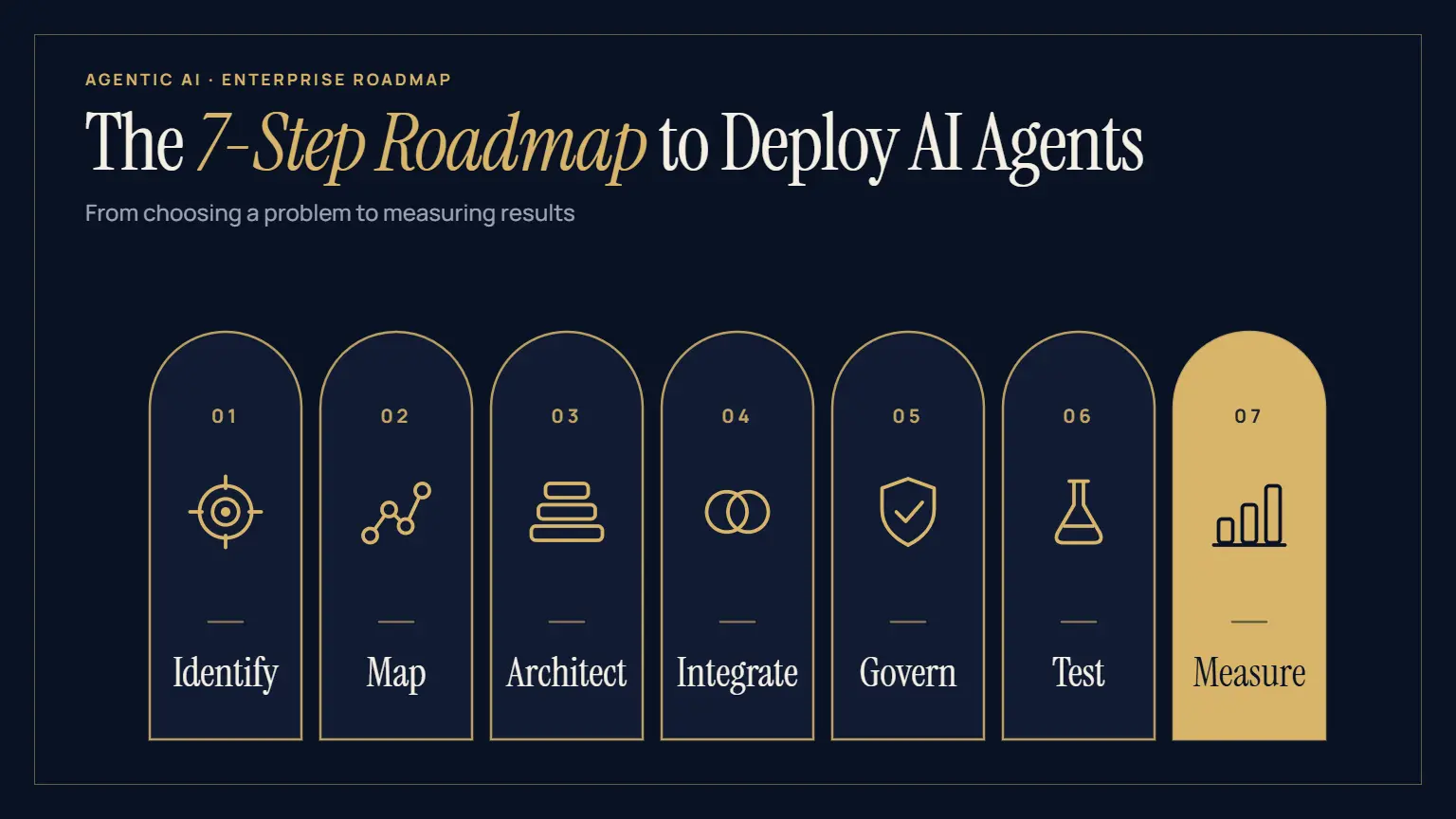
Step 1: Identify a Business Problem
Pick a workflow with measurable pain, such as repetitive support requests or invoice checks. Ask how much time it uses, where delays happen, and what success looks like.
Step 2: Map the Existing Workflow
Learn how employees do the task today: the applications, data sources, approvals, and exceptions. Simplify a poorly designed process before adding an agent.
Step 3: Select the Right Agent Architecture
One agent can handle a task that needs several approved tools. A multi-agent setup suits workflows that need different skills, such as document analysis, inventory checks, and reporting.
Step 4: Integrate Enterprise Systems
Connect the agent to systems employees already use, such as CRM and ERP platforms, databases, support tools, identity management, and APIs.
Step 5: Establish Security and Governance
Define authentication, role-based permissions, data privacy and retention rules, approval rules, audit logs, escalation paths, and incident response.
Step 6: Test in a Controlled Environment
Test normal requests, missing information, unexpected instructions, API failures, and cases that need human approval. Check that the workflow completes safely, not just that the answer sounds right.
Step 7: Measure Results and Expand Gradually
Compare results with the original process: completion time, success and error rates, time saved, cost per task, and customer response time. Expand only when results are reliable.
The Technology Stack Behind Reliable AI Agents
Reliable agents need more than a language model. They need components for reasoning, retrieval, tool use, coordination, and monitoring.
- Large language models (LLMs): interpret instructions, understand context, and support decisions or responses.
- Retrieval-augmented generation (RAG): connects AI systems with relevant business documents and knowledge sources.
- APIs and tool calling: allow agents to interact with business applications, databases, and approved services.
- Workflow orchestration: coordinates tasks, manages execution steps, and controls agent interactions.
- Vector databases and knowledge systems: support semantic search across large collections of information.
- Monitoring and evaluation tools: help teams understand agent behavior, identify failures, and measure performance.
The right mix depends on the use case, existing infrastructure, and security needs. A modular design lets teams swap models and improve integrations without rebuilding everything.
Also Read: Technology Stack Used in Agentic AI Development
How Real AI Product Development Supports Enterprise Readiness
Real products show that enterprise-ready AI depends on user experience, data handling, integration, and reliability, not just the model.
CodeStore Technologies built SiBot, an AI-powered virtual companion and smart assistant app focused on personalized conversations. SiBot is a conversational app, not an enterprise workflow deployment, but it shows how to design around interaction and user experience.
That matters in enterprises too. Employees and customers need to know what an agent can do and when a human takes over.
What Should Businesses Look for in an Agentic AI Development Partner?
Choose a partner that can show how the solution will run in your real environment, not just in a demo. Ask these six questions:
- Business process analysis: Can the team identify workflows suitable for agentic AI?
- Architecture design: Can it recommend a practical single-agent or multi-agent approach?
- System integration: Does it have experience connecting AI solutions with enterprise applications and APIs?
- Security and governance: Can it implement access controls, monitoring, and human approval mechanisms?
- Testing and reliability: How will the system handle errors, unexpected inputs, and failed integrations?
- Long-term maintenance: Can the solution be monitored, improved, and scaled as requirements change?
At CodeStore Technologies, we also provide agentic AI development services. For any enterprise agentic AI implementation, the focus should be the right use case, the necessary integrations, and an architecture that can grow with the business.
The best implementation is not the one with the most agents. It is the one that solves a real business problem reliably.
What Will Enterprise Agentic AI Look Like in 2027?
By 2027, enterprise AI will likely focus on connected workflows and measurable outcomes, not separate assistants for each department.
Gartner forecasts that 33% of enterprise software applications will include agentic AI by 2028, up from less than 1% in 2024. Five shifts stand out:
- More specialized AI agents designed for responsibilities such as customer operations, procurement, reporting, and IT support.
- Greater system integration so agents can access enterprise applications, internal knowledge, and approved business data.
- Stronger governance, including permissions, auditability, and human oversight.
- Workflow redesign that improves how work is performed instead of simply adding AI to existing processes.
- Closer attention to return on investment (ROI) through operational improvements, cost efficiency, productivity, and business performance.
The leaders will not necessarily be the first to deploy agents. They will be the ones who know where autonomy helps and where human judgment is essential.
Conclusion
The future of enterprise AI is not simply about deploying more intelligent tools. It is about building systems that can complete useful work while remaining secure, understandable, and accountable.
Moving from pilot to production takes more than a capable model. Successful enterprise agentic AI implementation means rethinking workflows, improving data foundations, connecting existing applications, and setting clear rules for autonomous actions.
For 2027, the best starting point is a well-defined business problem, not an ambitious AI experiment. With the right governance, AI agents can become a dependable part of everyday operations.