


iOS 27 AI Frameworks: What They Mean for Mobile App Development
Key Takeaways
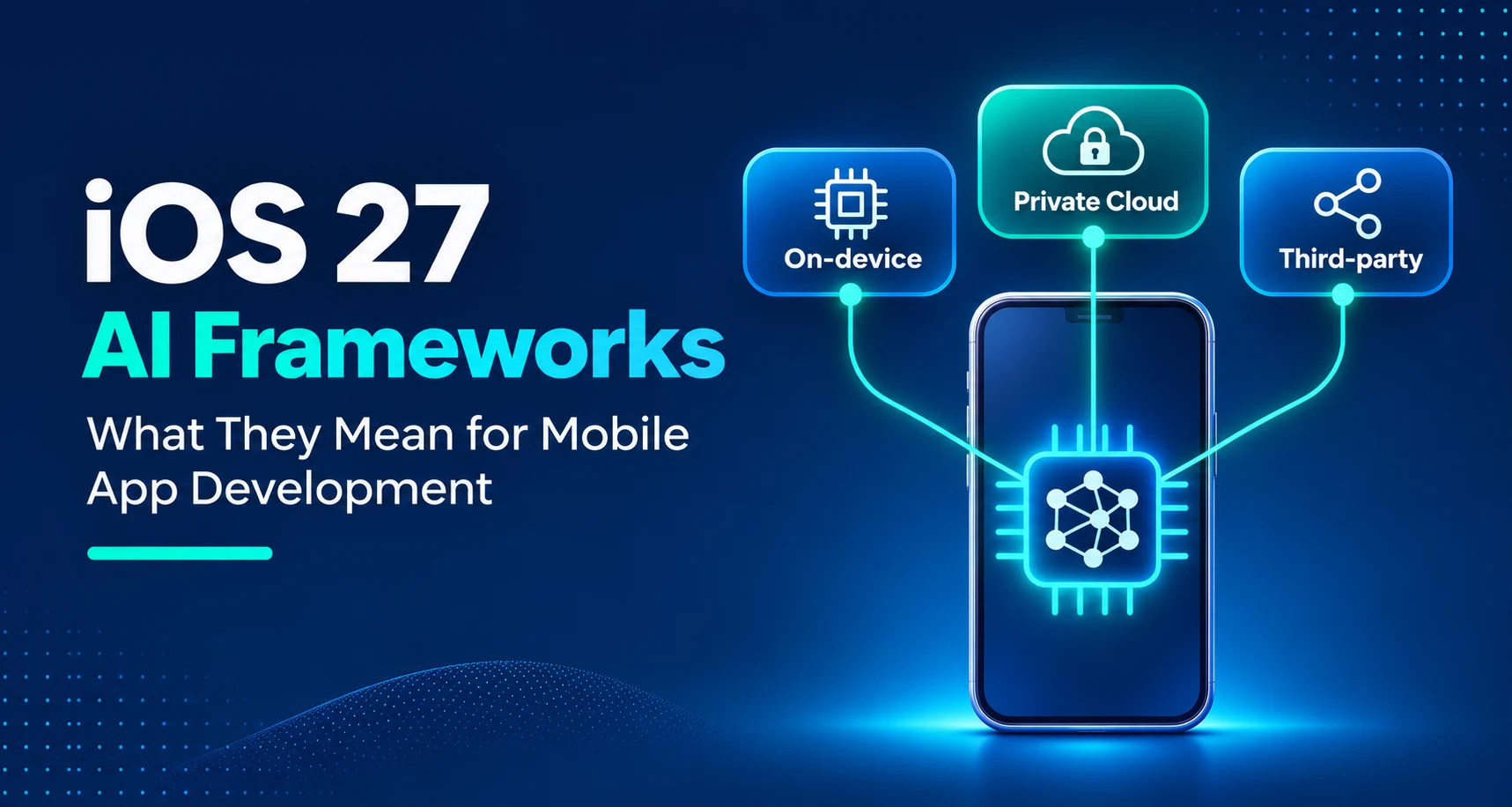
- Apps can use three models: Apple’s on-device model, Apple’s Private Cloud Compute (PCC) model, and third-party models.
- Placement should follow data sensitivity, complexity, connectivity, and scale.
- Device, storage, language, region, and daily-usage limits reduce your audience.
- Generative features can help apps, but outputs may vary and require evaluation.
Apps can already call outside AI services and use Apple’s on-device model. With iOS 27, apps can use a unified framework to access Apple’s on-device and cloud models, and various third-party models. So the question becomes “where should each AI task run?”
This guide reviews what changed, framework and model limits, costs, and how to test and safely roll out AI features.
What’s New in iOS 27?
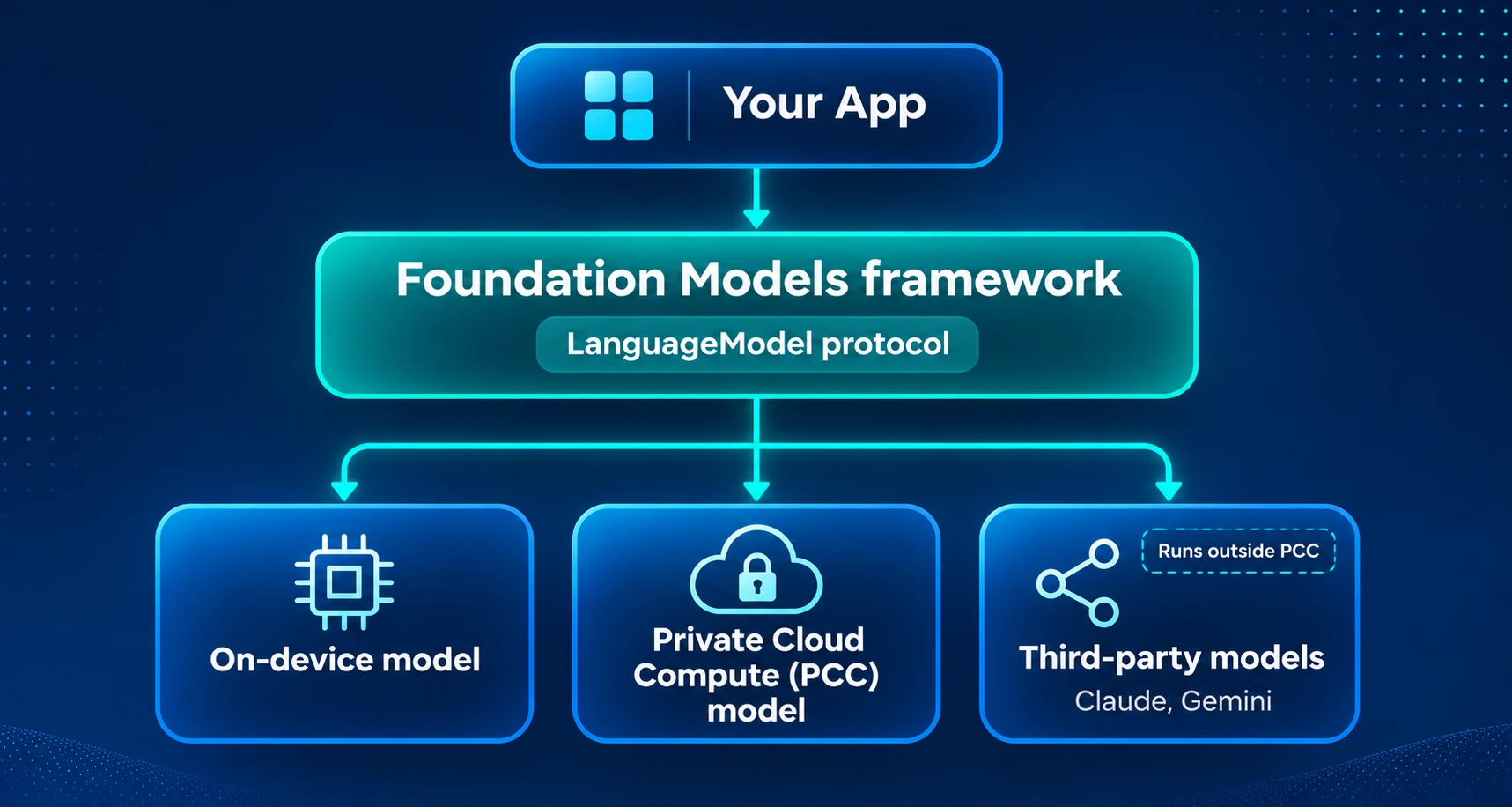
The major changes are in structure. The Foundation Models framework is built on the LanguageModel protocol. Apple’s on-device and PCC models both conform to the protocol, and so do other cloud models. Claude and Gemini are provided in Apple’s documentation as examples of cloud models. Third-party models run outside PCC. As a result, their prices, terms, and availability are set by the provider.
The three most important changes for business apps are:
- Multimodal prompts. Apple’s on-device model can now take images with text prompts, which can be helpful if the evidence is in a picture (like a damaged piece of equipment) or in a paper or electronic form. Large images use more tokens and cause more latency, so resize first. Image answers still need verification.
- Vision tools. The model can use Vision framework tools like OCR and barcode reading on-device. They are useful for capturing text or barcodes without entering the data manually. That said, accuracy drops for text in poor conditions, such as damaged or glare-prone surfaces and odd angles. Show the result for confirmation to improve accuracy.
- Dynamic Profiles. These allow an app to change instructions, tools, and models within a single continuous session. For example, a support app can keep one conversation while switching instructions for billing questions. This is also useful when long documents need to be handed off to a larger model. Test each profile to see how the model’s behavior changes.
Apple’s iOS 27 developer overview covers the full list, including Core AI and the Evaluations framework. A primer on AI in mobile app development covers the basics before picking a path.
| Your need | Apple option |
| Fast, private, and works offline | On-device Foundation Models |
| Longer inputs and stronger reasoning, with an adjustable reasoning level | PCC model (32,000-token context window) |
| A specific provider’s strengths | Third-party models via the LanguageModel protocol |
| Checking quality before launch | Evaluations framework |
A 4-Question Test for Where a Task Should Run
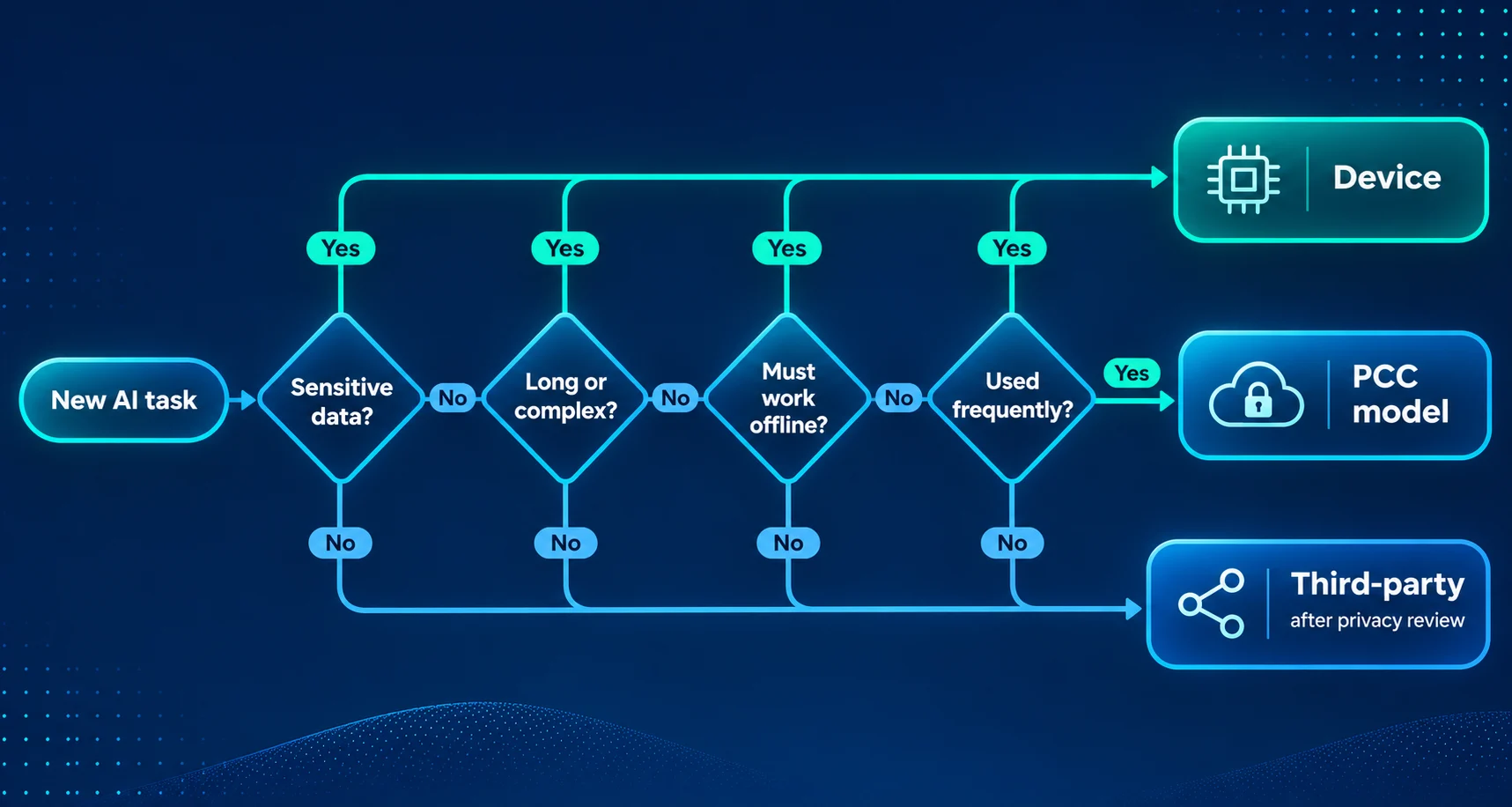
Choose per task, not per app. Ask four questions.
- How sensitive is the data? Personal notes, health, and financial details are easier to defend on the device.
- How complex is the task? Short summaries are light work. Long documents or multi-step reasoning may need the PCC model.
- What if the user is offline? The on-device model works without a connection. PCC does not.
- How much usage do you expect? PCC has a daily limit per user, so a feature used constantly behaves differently from one used occasionally.
| If the task is… | Run it on… |
| Private, short, and frequent | The device |
| Long, complex, or requires reasoning | The Apple PCC model |
| Needs a specific provider’s capability | A third-party model, after a privacy review |
| Not critical if AI is missing | The device, with a non-AI fallback |
On-device processing is a good starting point, but it is not a universal rule. Other factors may determine the best way to implement the feature. For example, if most users have unsupported phones or the tasks require extensive context, then a cloud or third-party implementation may be more appropriate.
Real Limits That Determine Your Path
Always check Apple’s Apple Intelligence requirements first, because they decide how many users get to see the feature.
- Devices: iPhone Duo, iPhone 16 models and later, iPhone 15 Pro, iPhone 15 Pro Max, and iPhone Air.
- Storage: Apple’s support page says the iPhone 17 Pro, 17 Pro Max, Air, 18 Pro, 18 Pro Max, and Duo need up to 14 GB of free space to run Apple Intelligence. Other supported models need up to 8 GB.
- Language: The device language and Siri language must be set to the same supported language.
- Region: Apple Intelligence doesn’t currently work on supported devices purchased in mainland China, or when the user is in mainland China and the Apple Account region is also set to mainland China. This may change, so check again before launch.
- Daily limits: PCC sets a daily limit on what each user can do, and the limit is higher with iCloud+. If the limit is reached, the framework returns an error, and the app needs to handle it.
“On-device” means the model runs on the device, not that the data stays private. What your app does with the data afterward is up to you. Check with your providers and business partners what happens with the data, how long it is kept, and under what conditions. If the task can be performed with less data, use less.
Keep Siri AI separate in planning, since its EU restriction does not cover Apple Intelligence as a whole. Every feature also needs a non-AI fallback.
What it Costs, and Where “Free” Ends
Apple has not published prices for expanded Private Cloud Compute use. Under Apple’s Private Cloud Compute eligibility rules, developers must have fewer than 2 million first-time app downloads, be part of the Small Business Program, and have the PCC entitlement. If either limit is crossed, including leaving the Small Business Program, the developer has 6 months to migrate. Apple has said expanded use will come at a charge in the future.
How cost behaves depends on the kind of request:
- Short, frequent on-device tasks: there is no per-request server charge. The cost is mostly engineering, plus an audience limit from supported devices.
- Complex PCC requests: there’s no API cost within eligibility, but each user has a daily limit, and Apple has not disclosed its size. Deeper reasoning uses more compute.
- High-volume third-party usage: billed by the provider under its own terms, so assess pricing, rate limits, and data terms at your expected volume.
- Image-heavy and long-context requests: larger images and longer context mean more tokens and latency on any path, so trim context and resize images.
- Engineering effort: fallbacks, evaluation, and retesting after each iOS update apply everywhere.
For the wider budget picture, see how mobile app development cost works in the USA.
Real Apps and What They Teach
Several shipping apps already use on-device AI, and they are examples of early adoption from the iOS 26 era. They don’t prove that these apps use every capability of iOS 27.
- Apple’s newsroom mentions SmartGym, Stoic, CellWalk, and Stuff as apps built with the Foundation Models framework.
- Zoho’s Notebook and Tables apps use local models for summarization, translation, and transcription.
Speed, data handling, and fallback strategy are key considerations for the first release of a conversational AI app, similar to the AI-powered virtual assistant app in the Sibot case study. It’s a portfolio example only, and does not claim to use the iOS 27 frameworks.
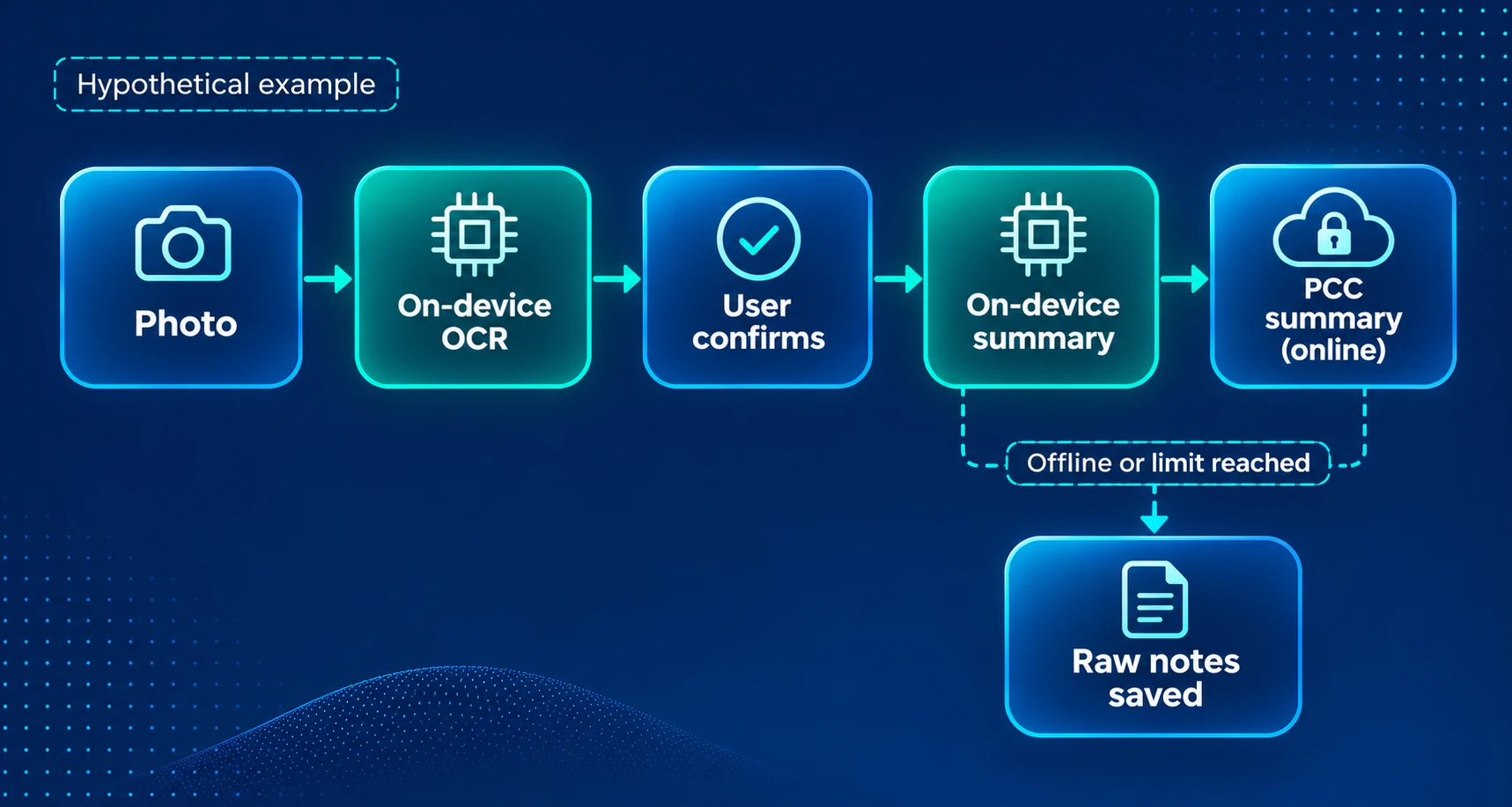
A hypothetical walk-through. This is an illustration, not a client project. Field-service employees can log job details using the app.
- A field-service employee takes a picture of a piece of equipment, and the app uses on-device OCR to capture the model number and serial number. The employee verifies the information before it is saved.
- Notes can be summarized on the device, and this works offline. The original note is saved alongside the summary.
- A longer summary is sent to the PCC model when the device has an internet connection.
- If the device is offline or the limit is reached, the raw notes are saved and the summary is queued. If a summary fails, the app keeps the original note.
- On unsupported devices, the app shows the raw notes.
Limit the size of photos to control tokens. Check the terms of service of any third-party provider that handles job data, since client contracts may prohibit it.
How to Test AI Features Before Launch
Traditional testing assumes the same input will always give the same output. With generative AI, this isn’t always the case. You can define inputs and expected outputs, and grade them automatically using Apple’s Evaluations framework.
With field-service summaries, the checks could include dates and job statuses. Technical details like part numbers and measurements should be copied correctly. Important information like warnings and customer actions should also be preserved.
No invented facts: the summary includes no extra details, steps, or conclusions that are not found in the notes.
Use exact-match checks for dates, codes, and numbers, and have an expert verify for invented facts. In addition, run checks with abbreviations, mixed languages, and long notes. Run checks on supported and unsupported devices, with low storage and mismatched languages, and again after every iOS update.
Treat summaries as drafts that a technician can edit, and send legal, billing, or safety outputs to human review. Add every real failure to the test set, and set a release gate, such as no launch while invented facts appear above an agreed rate. Pair this with a mobile app testing checklist before launch to see if the app is ready.
A 5-Step Rollout Plan
Pick a frequent, low-risk, measurable task and set one success metric, such as time saved per job. Choose the path using the 4-question test, and build the non-AI fallback first. Then pilot with a small group and judge the results against your metric. Finally, expand and retest, adding features one at a time and rechecking after each iOS update.
A guide to adding AI features to an existing app shows how to fit this into a current codebase.
Conclusion
iOS 27 allows you to decide where AI work happens, task by task. Usually, private, frequent tasks are best to keep on device. More heavy reasoning can go to Apple’s PCC model. Using a 3rd party model is best when a capability is really needed and you have verified how that model handles your data.
Depending on your approach, build against the limits early: supported devices, storage, regions, daily usage limits and Plan for failures. Start with a workflow, test against the most critical failures, build a fallback, then expand.
If you need more assistance to build this, a mobile app development company with AI experience can best match each task to the right path before you build. That is something CodeStore can help you with.