
table of content
- Common UI/UX Challenges and AI-Driven Ways to Address Them
- UI Mistakes vs UX Mistakes: How to Tell Which One You Have
- Where the Evidence Comes From (and What AI Can and Cannot Do With It)
- Mistakes in the First Minute
- Layout and Navigation Mistakes
- Interaction Mistakes
- Speed, Trust and Inclusion Mistakes
- What to Fix First
- A Quick Example: One Review Pass, One Fix
- Conclusion
- FAQs


Mobile App Security: Risks, Best Practices, and How to Protect Your Application
Essential Strategies to Secure Mobile Apps and User Data
Quick answer: Mobile app security is the practice of protecting a mobile application, the information it handles, and the services it connects to from unauthorized access, data exposure, fraud, and tampering. It requires secure authentication, protected data storage and network communication, carefully limited permissions, trusted software components, security testing, and ongoing maintenance.
Summary: Mobile App Security
Protect the entire app environment, including the mobile client, data stored on the device, networks, backend services, and third-party components.
First, address weaknesses such as poor session controls, exposed local data, unsafe network communication, overly broad permissions, vulnerable libraries, and a lack of server-side controls.
Use platform security features, modern cryptography, least-privilege access, dependency reviews, and code analysis. Also perform manual security testing.
Evaluate AI components separately for risks involving data sharing, injection attacks, tool permissions, credential handling, and the need for user confirmation before sensitive tasks.
Test regularly throughout the app’s lifecycle, especially during development and after major updates.
What Is a Mobile App Security?
Mobile app security involves the design, development, and operational decisions that protect an app and its users from attacks and misuse. It includes the app installed on a mobile device, the data stored on the device, the data transmitted to and from the device, and the services that process data on the app’s behalf.
It is part of cybersecurity. Application security focuses on the design and development of secure software to minimize vulnerabilities.
Mobile app security takes the characteristics of mobile devices into account. Phones can be lost or shared. Apps may operate on networks outside the developer’s control. Attackers may tamper with an app package or compromise the mobile device.
For a shopping app, security measures must protect a user’s saved login credentials, customer addresses, order history, payment information, and other sensitive data. Encrypting network traffic alone does not ensure security. The app could still store a reusable access token, or the backend could process a request without verifying ownership.
Why Is Mobile App Security Important?
The goal of mobile app security is to prevent attackers from taking control of app accounts and exposing users’ personal information. Security vulnerabilities can affect users and businesses operationally, financially, and legally, as well as raise ethical concerns.
Consider the shopping app example: if an in-app payment relies on a session token, an attacker who gains control of the session may be able to reuse the token to make a payment on the user’s behalf. In a healthcare app, inadequate access controls could expose documents unrelated to the feature being used.
Security is also important for ensuring that data is handled responsibly. App developers should be able to justify the data they collect. The data must be protected appropriately and deleted or rendered unusable when it is no longer needed.
The controls required for an app depend on its risk profile, the sensitivity of the data it processes, its business model, and applicable laws.
Mobile App Security vs. Cybersecurity vs. Application Security
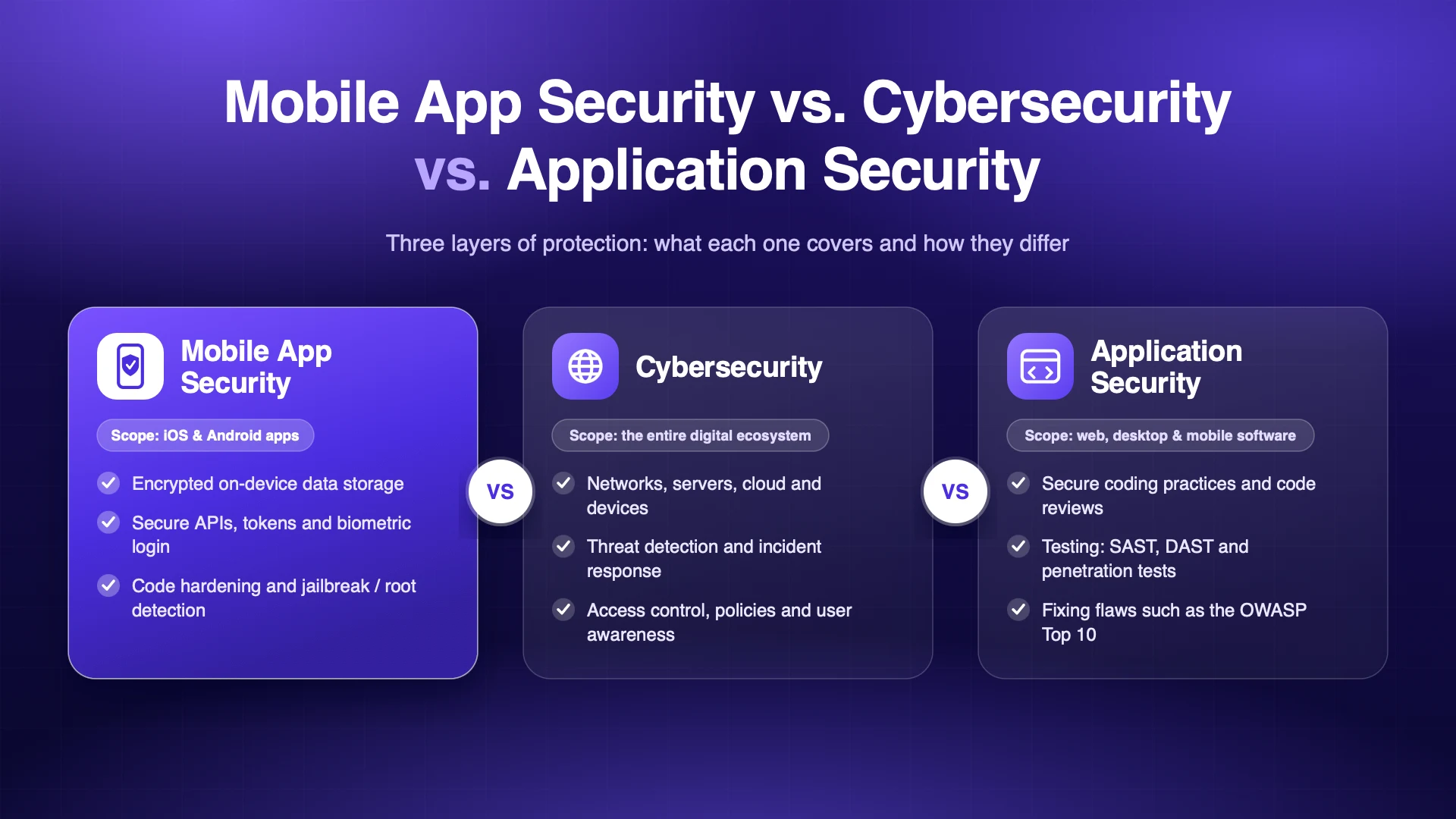
Cybersecurity is the broadest of the three, encompassing the protection of assets across the entire digital environment from threat actors.
Application security focuses on the security of software and its associated ecosystem.
Mobile app security encompasses application security principles and focuses on the mobile app ecosystem, including local device storage, mobile operating system permissions, communication between apps, the risk of device compromise, and app reverse engineering.
A mobile app can be secure at the user interface (UI) layer and still be vulnerable if, for example, the backend lacks authorization controls, or the app stores user data in device diagnostic logs.
Common Mobile App Security Threats and Risks
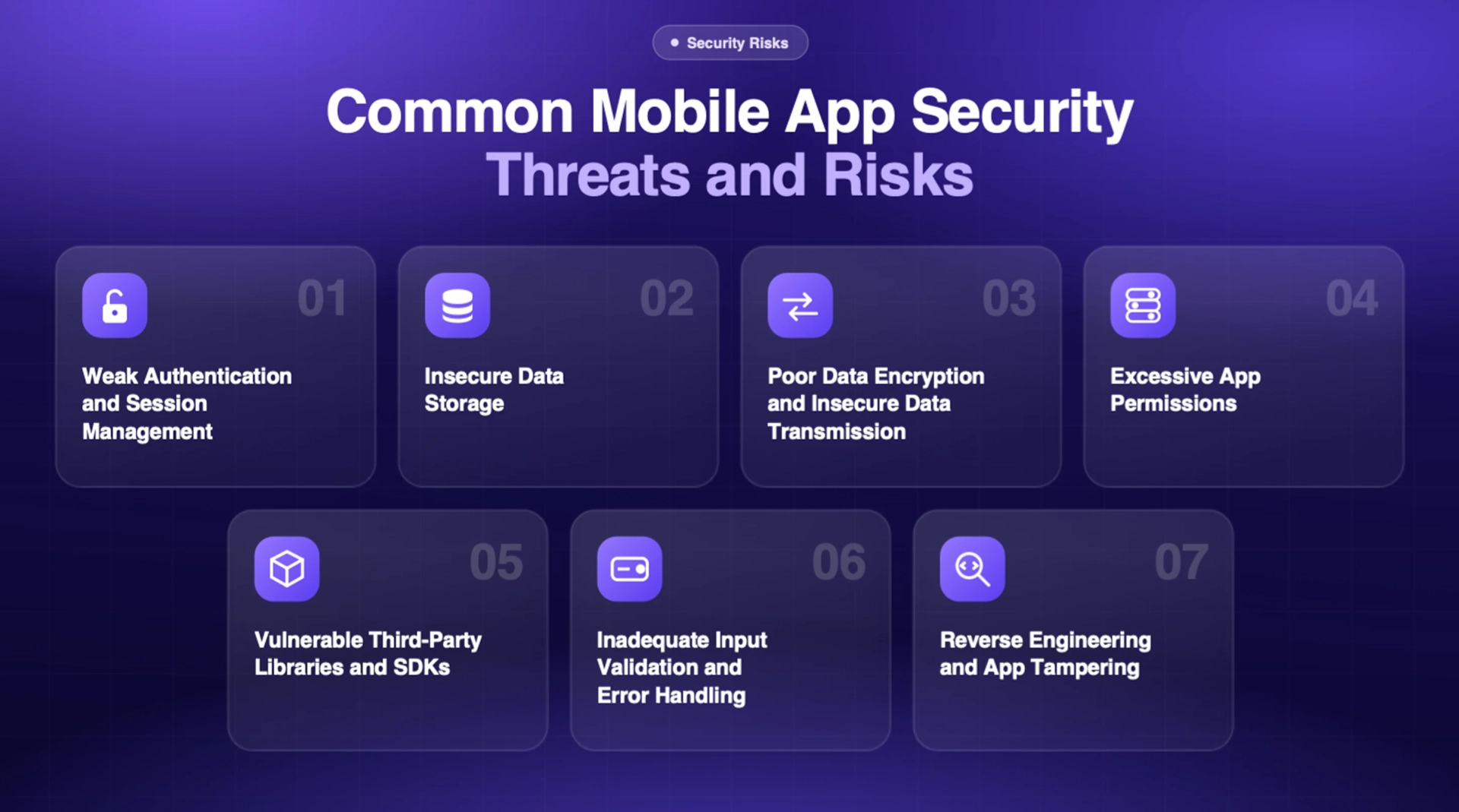
Weak Authentication and Session Management
Authentication identifies a user, while authorization determines which actions that the user can perform. Predictable tokens and sessions that never expire can enable account takeover. For example, if delivery personnel lose a phone and someone else gains access to the delivery app through an active session, that person may be able to view customer order histories.
For protected actions, first establish the user’s identity and then verify the user’s authorization. Tokens and sessions should expire and be revoked when the risk warrants it.
Insecure Data Storage
Mobile apps may unintentionally store user information, including access tokens, personal information, and other data that should not be retained. This information may be stored in databases, logs, preference files, or other forms of device storage.
If a device is lost or accessed by an unauthorized person, locally stored data may be compromised.
Minimize locally stored data and delete it—or protect it through encryption—after a predefined retention period. Data in transit should be protected through encryption and integrity checks. Protect both data and keys on the device by using Android Keystore or Apple Keychain, as appropriate. Assume that data stored in a private app directory could be exposed if the device is compromised.
Poor Data Encryption and Insecure Data Transmission
Data may be stored on a device or transmitted from the device to a service. An app may accept an invalid certificate or communicate over HTTP. If an app accepts invalid certificates or uses unencrypted HTTP, it may expose data on an untrusted network.
Use up to date, supported TLS configurations. Validate server certificates and hostnames. Avoid temporarily disabling certificate checks to work around development issues. Encrypt sensitive data when the threat model requires it. Use well-maintained and supported cryptographic libraries and protect encryption keys and certificates appropriately. Certificate pinning may be useful in selected high-risk apps; however, it requires a safe rotation and recovery plan.
Excessive App Permissions
A permission may allow an app to access sensitive user data or device features, such as contacts, location, the camera, or the microphone. A notes app that requires continuous location access to create a note collects more user data than necessary, increasing the risk and potential impact of a data compromise.
Apply the principle of least privilege and explain the reason for each permission request to users in clear, understandable language.
Consider using features that offer limited or one-time access when available. Review permission declarations whenever app behavior changes because of new or modified features and SDKs. If a user denies a permission request, determine whether the app can still operate safely without it.
Vulnerable Third-Party Libraries and SDKs
When developing an app, consider how much code and data flow within a third-party library or SDK the app team must trust. A team may use a third-party analytics SDK, for example, but the SDK may collect information beyond the team’s expectations or control.
Create an inventory of all dependencies and document the reason for each one. Monitor security advisories and scan for known vulnerabilities. Before releasing an app update, review SDKs and packages and test upgrades. Dependency scanners can be useful, but they should not replace reviews of a component’s source code, configuration, and behavior.
Inadequate Input Validation and Error Handling
An app receives input from various sources, including users, files, deep links, other apps, and remote services. If input is trusted without validation, malformed or unexpected values may be accepted and acted upon, potentially resulting in injection attacks or unintended actions. Detailed error messages may also reveal sensitive information or implementation details.
Validate inputs at trust boundaries and decision points. Use allowlists and range checks and parameterize database queries. When displaying errors, handle messages in context to protect personal information and avoid revealing system or implementation details.
Reverse Engineering and App Tampering
Once an app is published, attackers can download and inspect it. They may alter its code to change its behavior or repackage the app.
Techniques such as obfuscation and integrity checks can make some forms of tampering more difficult, but they cannot keep client-side code secret or make it fully trustworthy.
Never store permanent keys or credentials on the device, and do not make critical authorization decisions on the device. Verify sensitive operations on trusted backend systems. For higher-risk applications, consider app integrity signals, anti-tampering controls, and abuse monitoring while accounting for legitimate use on modified devices and the possibility of false positives.
Best Practices for Secure Mobile App Development
Define Security Requirements Before Development
Start by mapping the data the application collects and the systems it connects to. Define a threat model for data flows based on potential threats, harm, and exposure. Create threat models for critical user journeys, and turn the findings into functional, testable requirements.
Implement Strong Access Controls
Design your application to use trusted, risk-based authentication. Enable multi-factor authentication where appropriate for the level of risk. Use short-lived or revocable access credentials. For every request to a backend service, verify that the requesting user is authorized to access the target object. Biometrics should be used to unlock or access a protected credential.
Protect Sensitive Data
Classify sensitive data before deciding how to store or transmit it. Never send sensitive data in clear text or expose it through logs, caches, or other intermediate storage.
Use the secure storage options provided by the platform. Encrypt sensitive data stored locally and use TLS to protect data in transit. Maintain a documented key management process. Define procedures for data retention, deletion, backups, and incident response rather than treating encryption as a complete solution.
Follow Android and iOS Security Guidance
Use secure defaults and the latest supported platform APIs. On Android, review exported components, intent filters, network security configuration, backup rules, and Keystore usage. On iOS, review URL schemes, App Transport Security, data protection, and Keychain usage. Revisit these settings whenever app capabilities change.
Review and Secure the Build Process and Dependencies
Project to build pipelines and code repositories with appropriate access controls. Review third-party SDKs for data collection and permission to use, scan app packages for vulnerabilities, and review and manage dependencies. Control access to development, test, and production resources to prevent test builds from accessing production systems.
Plan for Security Updates and Incident Response
Assign an owner to manage the vulnerability process. Rotate session keys and be prepared to revoke compromised sessions. Track vulnerabilities through remediation; do not assume that a vulnerability is managed simply because it has been documented. Establish a clear process for security updates and incident responses.
How AI Is Changing Mobile App Security
Adding AI features to mobile apps increases complexity and introduces more data flows and decision-making points.
A chatbot, document assistant, recommendation engine, or support agent may send user prompts and app context to an external model provider, retrieve user data, or initiate tool functions. The security design must cover the model provider, the app, the data retrieval layer, and all integrated systems.
Protect Data Sent to AI Providers
Before sending user, prompts or uploading documents to a third-party provider, understand which app data is being sent, whether it is retained, how it is used, where it is processed, and what deletion controls or contractual protections apply. Do not share more data than necessary. For example, if a support assistant only needs a shipment status, do not send the full shipping address.
Prevent Prompt Injection and Unauthorized Access
Prompt injection occurs when an AI system is manipulated into performing a function outside its intended purpose, such as revealing information it should not disclose. This may happen when an AI model receives user-generated content, such as documents, web pages, or user messages. Do not treat untrusted data as instructions. Enforce access controls on the app server, filter results according to user permissions, and do not rely on the AI model to make access-control decisions.
Secure AI Integrations and Actions
Store provider keys on a secure server, not in the mobile app. Give AI-integrated tools limited permissions and validate each proposed tool call against business rules. Log the action and its authorization context for auditing, but do not store unnecessary sensitive data.
Require explicit confirmation before performing sensitive actions, such as issuing a refund, changing account information, or processing a payment. Monitor unusual tool usage and implement safeguards to stop or reverse actions when necessary.
For a practical example of an AI-powered mobile app, see the case study Sibot – AI-Powered Virtual Friend & Smart Assistant.
How to Test Mobile App Security
Security testing assesses whether the controls described in the design have been implemented in the app. Perform a combination of automated and manual testing and include the backend and third-party integrations in the assessment.
Combine Automated and Manual Testing
Static application security testing can identify risky code patterns before execution, while software composition analysis (SCA) can identify dependencies with known vulnerabilities. Dynamic testing analyzes an app’s behavior while it is running. Manual penetration testing reviews the app’s workflows and potential attack points. Areas to examine include permission management, local storage, authentication, and authorization. Test boundaries and access controls by checking whether invalid or unauthorized inputs are identified and rejected. Security events should be logged appropriately.
Test negative scenarios deliberately. For example, submit malformed input, use invalid tokens, and attempt to access documents belonging to other users. Error messages should not reveal secrets, and security events should be logged without including sensitive information.
Test before release and after significant changes. Retest after architectural and dependency changes. For apps that handle high-impact data, such as financial, health, or identity information, consider an independent security assessment.
A mobile app testing checklist can help define functionality, compatibility, performance, and security tests.
Use the OWASP Mobile Application Security Verification Standard (MASVS) to define control expectations and the Mobile Application Security Testing Guide (MASTG) to identify testing techniques.
How to Evaluate Mobile App Development Companies for Security
When evaluating a mobile app development company, ask for evidence of how security is built into its process rather than a promise that the mobile app will be completely secure. You should be able to answer the following questions: How does the team threat-model sensitive features? How does it protect data? Are dependencies reviewed? How is authorization tested? How are vulnerabilities handled?
Ask who makes security decisions, which standards and checklists guide to the work, what automated and manual tests are performed, and how findings are prioritized. Also ask whether backend services and third-party SDKs are tested and what security deliverables are provided.
Finally, define responsibilities after launch. Determine who will monitor security advisories, deploy urgent fixes, manage signing credentials, respond to incidents, and support older app versions. Make sure your partner explains trade-offs and remaining risks clearly, because security is a shared responsibility.
Read more: 10 Questions to Ask Before Hiring a Mobile App Development Company
Conclusion
Ultimately, mobile app security is a shared responsibility between the developer and the mobile app user. Strong authentication and authorization, protection of stored data, encryption of data in transit, least-privilege permissions, careful selection of libraries and frameworks, appropriate testing, and dependency management can help address known vulnerabilities.
The use of AI in mobile apps also brings additional responsibilities for managing data sharing and controlling access to potentially sensitive actions and functions. Security requirements should be clearly defined and verified through repeatable tests. If you are planning a new app or want to review the security of an existing one, the team at CodeStore can help you assess the risks and build a safer Android or iOS app.