
table of content
- iOS vs Android App Development: How to Choose the Right Platform with AI
- Why Choosing Your First Platform Looks Different Now
- What the Market Data Shows
- Where Revenue Per User Differs
- The Cost, Time and Android Fragmentation
- Tools and Tech Stack: What Each Platform Needs
- On-Device AI: A New Reason to Pick a Platform
- App Store vs. Google Play: Review, Fees and Launch Speed
- A Simple AI-Assisted Framework to Decide
- When to Launch on Both Platforms
- Conclusion
- FAQs


iOS vs Android App Development: How AI Helps You Choose the Right Platform
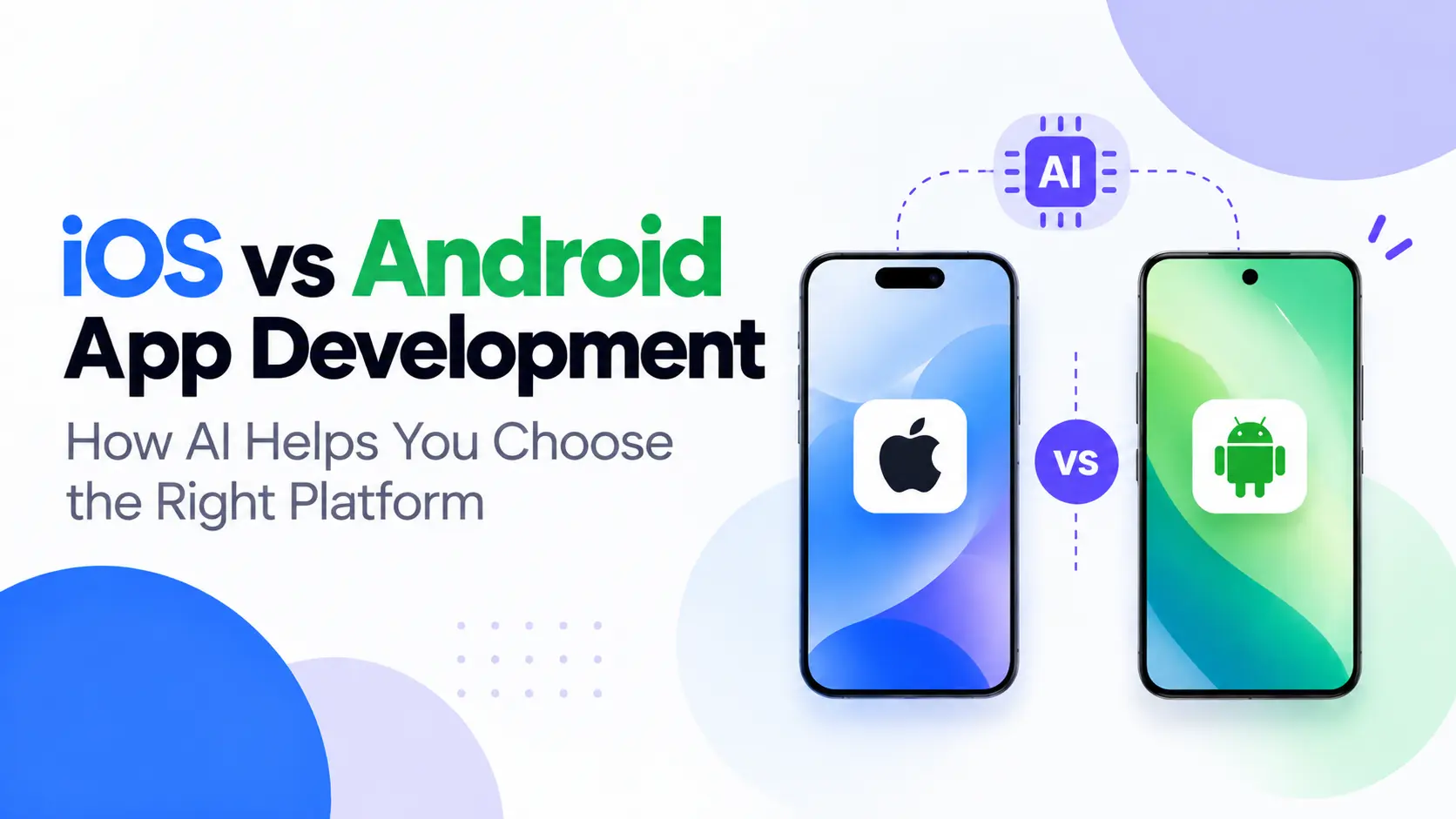
iOS vs Android App Development: How to Choose the Right Platform with AI
It’s common for founders to choose the mobile platform they’re most familiar with when starting an app project. However, this can be a poor decision, and choosing the wrong platform can waste months or even years developing for the wrong audience.
You can use AI to make a more informed decision. Instead of relying on your instincts, you can use AI to analyze audience data, forecast revenue for each platform, estimate development effort, and uncover the assumptions behind your decision. AI won’t make the decision for you, but it can help you organize your reasoning and validate your choices before development begins.
This guide explores the factors founders and product leads should consider when comparing platforms, including audience, revenue, costs, tools, and AI capabilities. It is intended for founders, product leads, and anyone discussing app development plans with a mobile app development company.
Quick Summary
The short answer is to build for the platform where your highest-value early users are and let the data guide your decision.
- Choose iOS first if your audience is primarily in the US or other markets with a strong iPhone presence, your main revenue stream comes from subscriptions or premium offerings, or you want to test your app across fewer device models.
- Choose Android first if your target audience is mainly in markets where Android dominates, your business relies on advertising, or you need to support more affordable devices.
- Launch on both platforms if your audience is genuinely split and your budget can cover the additional development and testing effort.
- Use AI for the legwork: Break down your audience, estimate effort, model revenue, and verify every important number before making a decision.
Why Choosing Your First Platform Looks Different Now
The conventional advice has been “iOS for revenue and Android for reach.” That is still a general industry tendency, but there are plenty of exceptions. Even apps in the same category may need different starting platforms because their audiences, target markets, and business models differ.
What has changed is how quickly you can test an assumption about a platform. AI tools can analyze competitor reviews, survey responses, or several months of website analytics and highlight useful patterns. As a result, research that once took a week may now take an afternoon.
However, there is a catch. AI summarizes the information you provide and may present numbers confidently even when it cannot support them with reliable evidence. The best approach is to ask it to explain its reasoning, identify the evidence behind each claim, and describe what could change the outcome.
Treat the output as a starting point for your analysis, then verify it against primary sources. This is especially important when evaluating iOS vs Android app development, because market trends alone cannot tell you which platform will work best for your specific audience.
The sections below follow the areas most teams consider when comparing platforms: audience, revenue, cost, tools, and platform features. AI can help in different ways at each stage.
What the Market Data Shows
Statistics by Region
For this comparison, we’ll use data collected by StatCounter.
In the US, the data for September 2026 shows that iOS accounted for approximately 53.6% of mobile operating system usage, while Android accounted for approximately 46.4%. Globally, Android accounted for approximately 69% of mobile operating system usage, compared with about 31% for iOS.
Keep in mind that mobile usage share is not the same as smartphone sales or the operating systems used by your target audience. More importantly, it does not necessarily reflect the devices your own customers use.
What This Means for You
For example, a B2B tool used by sales teams in the US may have a very different audience from a budget-friendly consumer app in the same country.
Understanding regional trends is useful. However, the real goal is to understand which platforms your specific users prefer. When planning iOS vs Android app development, your own audience data should carry more weight than general market statistics.
How to Use AI
Start by exporting your available data and uploading it to an AI tool. Ask it to group your users by device type and operating system.
Example prompt:
I have a CSV file containing my waitlist data, including users’ countries, device types, and sign-up sources. Group users by operating system and country, show the results as percentages, and flag any segment with fewer than 30 users so I don’t draw conclusions from a small sample.
If you don’t have any data yet, your first task is to understand who your users are. Researching whether your app idea has real demand can also help you discover where potential users spend their time. This guide on how to validate your app idea explains how to approach that process.
Regardless of the data you have, verify any statistics provided by AI against a primary source before using them to make a business decision.
Where Revenue Per User Differs
Broadly speaking, apps that rely on subscriptions and in-app purchases may perform well on iOS, while apps that depend on advertising may benefit from Android’s larger global user base.
However, revenue also depends on the country, pricing strategy, user behavior, and app category. Neither platform guarantees better results. Instead, build a revenue model for both platforms and make an informed decision based on realistic assumptions.
AI can be useful here. Ask it to create two simple revenue models, one for each platform, using conversion rates and pricing assumptions that you provide.
Example prompt:
Model monthly revenue for a subscription app at 1,000, 5,000, and 20,000 downloads. Use paid conversion rates of X% on iOS and Y% on Android, with an average price of Z. List all the assumptions you used and tell me which two I should test first.
Use reliable sources or your own test results to determine the percentages. Otherwise, AI may supply plausible-looking estimates that are not based on your actual audience.
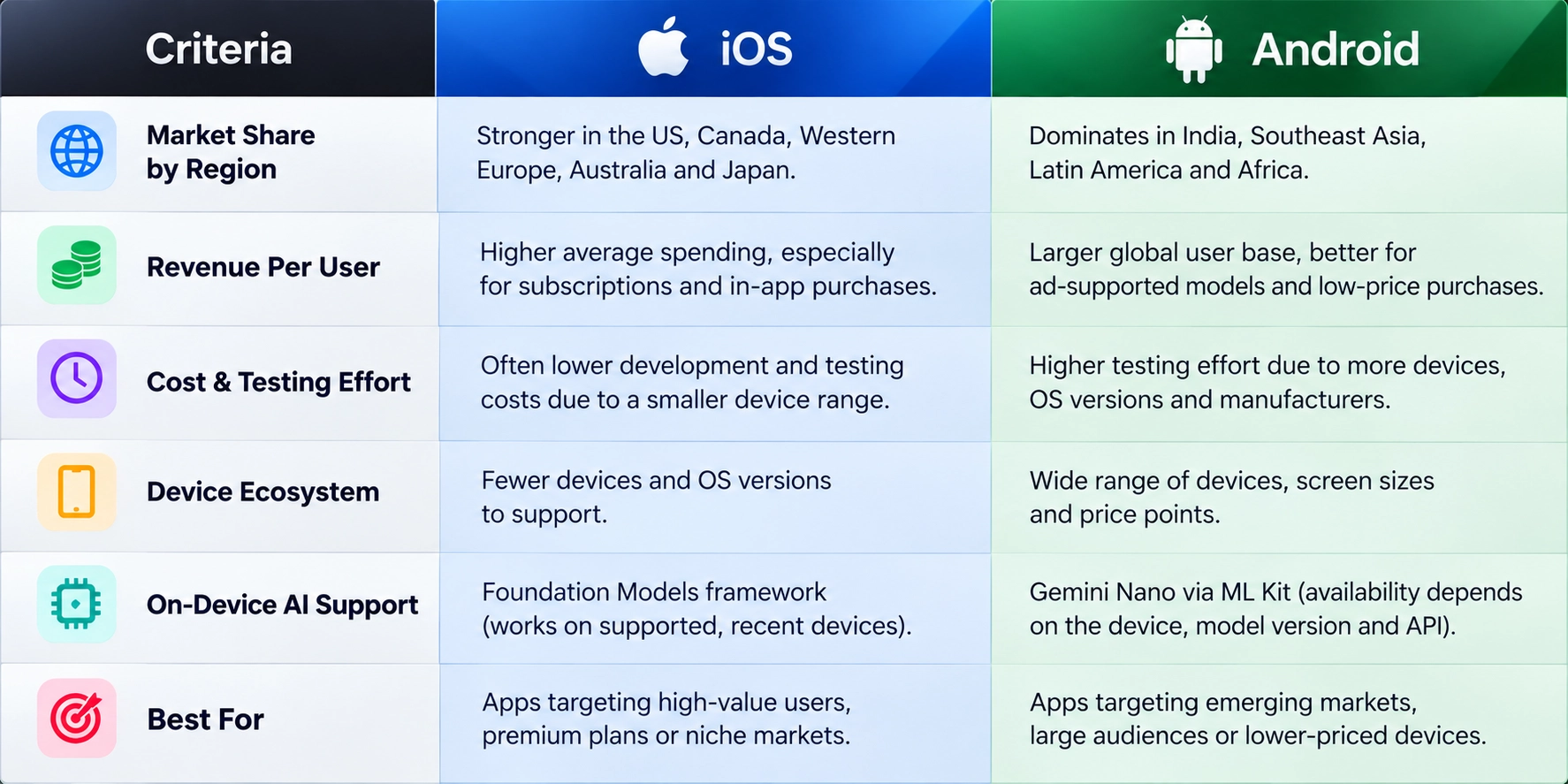
The table below gives you a general idea of which platform may be a better starting point.
The Cost, Time and Android Fragmentation
Why Published Cost Figures Disagree
Search for the cost of building an iOS or Android app, and you’ll find estimates that contradict each other. Some claim iOS is less expensive, while others argue that Android costs less. A few suggest that the difference is only a small percentage.
These estimates aren’t necessarily wrong. They may simply measure different things. Some focus on development team rates and feature requirements, while others consider design complexity and the number of devices that need testing.
Your best option is to estimate the cost of your own feature list. This breakdown of mobile app development costs in the USA explains the factors that can affect the overall budget.
Where the Time Is Really Spent
Testing an Android app can take longer because of the wide variation in screen sizes, manufacturers, devices, and operating system versions. In comparison, the iOS testing matrix is generally smaller because there are fewer device configurations to consider.
For many development teams, this difference in testing effort can have a greater impact on the timeline than the time spent writing the code itself.
How AI Helps Estimate and Test
Give AI your feature list and ask it to estimate the effort required for each feature, including the assumptions behind its estimates. Then compare the results with developer quotes, paying particular attention to features where the estimates differ.
For testing, ask AI to identify the device models and operating system versions that cover approximately 90% of your users, based on your analytics. This helps you build a test matrix around actual usage rather than guesswork.
AI can also help draft test cases based on user stories. However, your QA team should review those cases and test them properly before launch. This mobile app testing checklist outlines a complete pre-launch testing process.
Tools and Tech Stack: What Each Platform Needs
For iOS apps, development typically uses Swift and SwiftUI in Xcode. Android apps use Kotlin and Jetpack Compose in Android Studio. This means the skills your development team needs will differ, which is an important consideration when hiring developers or building an in-house team.
AI coding assistance is now available in both ecosystems. In Xcode, developers can work with AI models, including supported integrations with external models, and use local models on Apple silicon where supported. Android Studio includes Gemini, which can help developers preview Compose interfaces and investigate the causes of crashes.
Since both ecosystems offer AI-assisted coding tools, their availability alone should not determine your platform choice.
Here’s what this looks like in practice. A developer asks an AI assistant to draft a SwiftUI or Jetpack Compose screen from a short description and generate unit tests for the view model. The result is usually a useful starting point.
However, the developer still needs to review state handling, accessibility labels, error cases, and whether the code relies on an API that has changed. The tests must also be run, and additional edge cases need attention, such as empty lists, slow networks, and smaller screens.
AI can save development time, but the real benefit comes from helping developers produce and review code more efficiently, not from eliminating the need for testing.
That said, the team’s ability to build and maintain the app may matter more than a small difference in market share. This is particularly true if your team already has strong Swift or Kotlin skills. For more options, including cross-platform frameworks, see this guide to the mobile app tech stack.
On-Device AI: A New Reason to Pick a Platform
If your app uses AI features, the platform can matter more than before because Apple and Google offer their own approaches to on-device AI. These models run directly on supported devices, which can allow certain features to work without an internet connection and help keep processing local.
Apple: Foundation Models
Apple’s Foundation Models framework gives apps access to the on-device model behind Apple Intelligence. It requires a supported device and software version, so coverage is narrower than the entire iPhone user base.
The model is designed for focused tasks such as summarization, classification, and information extraction rather than unrestricted, open-ended reasoning.
Android: Gemini Nano Through ML Kit
On Android, developers can access Gemini Nano through ML Kit’s GenAI APIs.
Depending on the API and supported device, available features include summarization, proofreading, rewriting, and image description. Because processing happens on the device, these features can avoid the need for a separate server request for each operation.
However, availability depends on the device, model version, and API. Therefore, check Google’s current supported-device documentation before estimating how many users will be able to use these features.
Device Coverage and Fallback
Both platforms let your app check whether an on-device model is available at runtime. Your app should also be prepared for situations where the model cannot be used.
On iOS, the framework can report whether the model is available and, if not, why. For example, the device may be ineligible, Apple Intelligence may be turned off, or the model may not be ready yet.
On Android, ML Kit reports a feature status of unavailable, downloadable, downloading, or available. Google’s documentation identifies checking this status as the most reliable way to determine whether a device supports the feature.
The more important question is how your product will work for users with unsupported devices. There are three main options: provide a simpler version of the feature without AI, use a cloud model with its own privacy and cost trade-offs, or leave the feature unavailable.
Ideally, you should understand these trade-offs before deciding on a platform. The proportion of users who need a fallback may differ significantly between iOS and Android, depending on your audience’s devices.
Privacy, Offline Use and Task Limits
When a feature runs entirely on an on-device model, its input and output can stay on the phone, and it may work without an internet connection. This can be useful for privacy-sensitive features and people who frequently work offline.
However, on-device models have limitations. They are generally designed for specific tasks, such as summarizing or classifying text, rather than deep reasoning or broad knowledge tasks such as complex planning. Those requirements may call for a cloud model instead.
One Feature, Two Different Decisions
Consider a note-taking app with a button labeled “Summarize this note.”
If your users are primarily in the US and use recent iPhones, the iOS approach may be attractive. However, users with unsupported devices will need a simpler fallback if the on-device model is unavailable.
If your audience uses a wide range of Android brands and price tiers, you’ll need to investigate how many users have devices that support Gemini Nano through ML Kit. You may also need to plan a cloud-based fallback for the remaining users.
Long notes, multiple languages, or highly sensitive content may introduce additional limitations and push you toward a cloud model on either platform. In that case, other factors may determine which platform you choose.
The feature itself is the same in all these scenarios. The right starting point depends on the devices your audience uses. AI can help by analyzing your device breakdown and estimating what percentage of users could access the on-device version and what percentage might need a fallback.
However, confirm device compatibility using Apple’s and Google’s documentation. AI-generated information about supported devices can become outdated quickly.
App Store vs. Google Play: Review, Fees and Launch Speed
The developer fees differ. Apple’s developer program costs $99 per year, while Google Play charges a one-time registration fee of $25. Both fees are listed on the respective companies’ official enrollment pages.
Review times and rejection reasons vary across both stores. Therefore, check the latest guidelines and allow sufficient time for the review process rather than relying on general assumptions about which store is stricter.
AI can help with several launch-related tasks. For example, it can draft your app description and screenshot captions, suggest keyword variations for your store listing, and prepare initial responses to user reviews for you to edit.
It can also help with a preliminary compliance check. Paste your app description and permission list into an AI tool and ask which parts might conflict with each store’s published guidelines.
Use the response as a starting point for your own review, not as a final verdict. Store policies change, and AI summaries may not reflect the latest requirements. Always check the actual guidelines before relying on a policy-related answer.
A Simple AI-Assisted Framework to Decide
You can work through this method in about an hour. Start with five inputs, then decide how much weight to give each one.
- Audience: The share of your target users on each platform, based on your waitlist, survey, or analytics.
- Revenue model: Subscriptions, one-time purchases, advertising, or B2B contracts.
- Budget and timeline: What you can afford to build and test.
- Feature needs: On-device AI, hardware access, background processing, or other platform-specific capabilities.
- Team: The skills your team already has or can hire.
Set the weights yourself before asking AI for help. For example, a subscription business might prioritize audience and revenue, while an app that depends on on-device AI might give more weight to device coverage.
Next, separate measured facts from estimates and assumptions. Waitlist data is a measured input, projected conversion rates are estimates, and the effort required to build the product is an assumption until you have a reliable estimate.
Give AI your inputs and weights, then ask it to compare the available evidence rather than generate an overall score.
Example prompt:
I am considering an iOS or Android release for the first version of my product. My criteria and their weights are [list them here]. Here is the supporting evidence for each platform: [provide the evidence]. For every criterion, compare the evidence for both platforms and explain how strong the comparison is. Identify what is unknown and name the piece of evidence that could change the outcome. Do not provide an overall score.
Avoiding an overall score is intentional. A number such as 4.2 out of 5 may look precise, but it can hide assumptions and uncertainty. The gaps in the evidence are often more useful.
For example, if your decision depends on audience preferences, speak with ten more potential users. If it depends on cost, get a second development quote.
Once you’ve made your choice, keep the first version of your product small. A focused initial release can teach you more than a polished, feature-heavy app that nobody has tried. This comparison of an MVP vs. a full-scale app can help you decide how much to build.
A delivery or fleet product is another useful example because drivers’ phones are often determined by operational requirements rather than personal preference. The Loggie logistics app case study illustrates this type of product.
Starting with one platform is not always the right choice. If your audience is roughly evenly split or your business customers use both iPhones and Android devices, launching on both platforms from the beginning may make sense.
You can build native apps in sequence or use a cross-platform framework with a shared codebase. Each approach has advantages and disadvantages, and on-device AI features may require additional native code in a cross-platform build.
To compare the options, run the decision prompt from the previous section again, this time including cross-platform development as a third option. For a more detailed comparison, see this guide to native vs. cross-platform app development.
Conclusion
Choosing your first platform comes down to where your target users are, how your business will earn revenue, and what your product needs to do.
In most cases, start with the platform that best matches your validated audience and business model. If a core feature depends on on-device AI, check device compatibility and decide how users with unsupported devices will access that feature.
If audience fit and technical requirements are comparable, your budget and testing effort can help determine which platform to launch first. You should also consider how much you can realistically invest in acquiring users.
AI can reduce research time and make assumptions easier to identify. It can organize waitlist data, model revenue, estimate development effort, and highlight potential risks in a store listing. However, it cannot independently verify every result or replace conversations with real users. Check the numbers and keep the first release small enough to learn from.
If you’d like a second opinion on which platform to start with before development begins, CodeStore can help you work through the decision.